
Medical Appointment Setting Services
What is Appointment Setting in medical billing?
Appointment setting in medical billing is scheduling combined with revenue-protecting intake steps. It’s not just booking a time it’s capturing correct insurance and patient details, confirming coverage rules when needed, setting patient expectations about copays/deductibles, and ensuring the visit is scheduled in a way that supports clean billing and faster reimbursement.
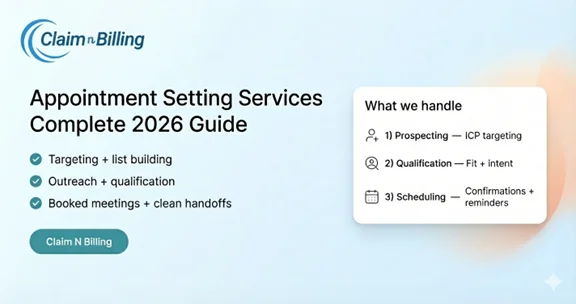
Table of Contents
Why Appointment Setting Matters for Medical Billing
Most billing issues start before the patient arrives. Incorrect insurance details, missing demographics, or unclear expectations about patient responsibility can turn into denials, rework, delayed cash flow, and unhappy patients.
Appointment setting that supports billing helps you:
- Reduce eligibility-related denials (incorrect payer/plan/member ID)
- Improve front-end collections (clear copay/deductible expectations when appropriate)
- Prevent authorization surprises (when a service or payer requires prior authorization)
- Reduce no-shows and late cancellations (protecting provider productivity)
- Create cleaner claims by ensuring correct intake data is captured upfront
What’s Included in Medical Appointment Setting Services
- Inbound call/text/email intake and appointment booking
- New patient intake (demographics, reason for visit, provider preference, scheduling constraints)
- Insurance capture and verification-ready data collection
- Appointment confirmations, reminders, reschedules, and cancellation handling
- Waitlist management to backfill cancellations
- Pre-visit billing coordination (eligibility checks, patient responsibility estimates, PA triggers when applicable)
- Handoff notes for the clinical team and billing team (so everyone has the same context)
Appointment Setting vs. Front Desk Scheduling vs. Medical Billing
| Function | Primary goal | Typical tasks | Billing impact |
|---|---|---|---|
| Appointment setting | Book the right visit with clean intake | Intake, scheduling, confirmation, reminders | Improves data accuracy and reduces avoidable denials |
| Front desk scheduling | Manage day-to-day clinic flow | Check-in, same-day adjustments, walk-ins | Affects copays, signatures, and documentation flow |
| Medical billing | Turn visits into payment | Coding, claim submission, follow-up, denials | Collects revenue after the visit |
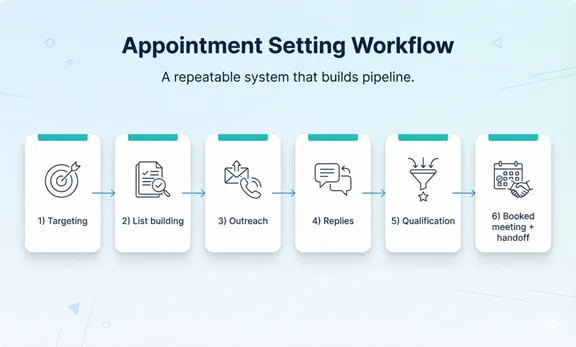
End-to-End Workflow (Intake → Schedule → Confirm → Pre-Visit Checks)
-
Inquiry intake (new or returning patient)
Capture the reason for visit, preferred location/provider, availability, and contact method (call/text/email). -
Patient information capture
Collect name, date of birth, phone/email, address, and any required clinic intake questions. -
Insurance capture (verification-ready)
Collect payer name, member ID, group number (if applicable), and subscriber details. Request images of insurance cards when available. -
Schedule the correct appointment type
Match the visit type and time length to the clinical need and clinic rules (new patient vs follow-up, procedure visits, etc.). -
Confirmation + reminders
Confirm the appointment and send reminders based on the clinic’s cadence (e.g., 72 hours + 24 hours + same-day). -
Pre-visit billing coordination (as configured)
Trigger eligibility verification, patient responsibility estimates, and prior authorization checks when needed. -
Day-of readiness and backfill
Handle cancellations, reschedules, and waitlist backfill to protect the schedule and revenue.
Insurance Capture: What We Collect at Booking
Clean insurance capture at booking prevents a large percentage of avoidable claim denials. The goal is to collect verification-ready data without over-collecting.
Standard insurance fields
- Payer name (and plan type when known)
- Member ID and group number (if applicable)
- Subscriber name and date of birth (if different from patient)
- Relationship to subscriber
- Policy effective date (when available)
- Insurance card images (front/back) when possible
Red flags we catch early
- Payer name doesn’t match the member ID format
- Subscriber/patient mismatch (common with dependents)
- Missing group number when plan typically has one
- Coverage that may be inactive or tied to a different plan
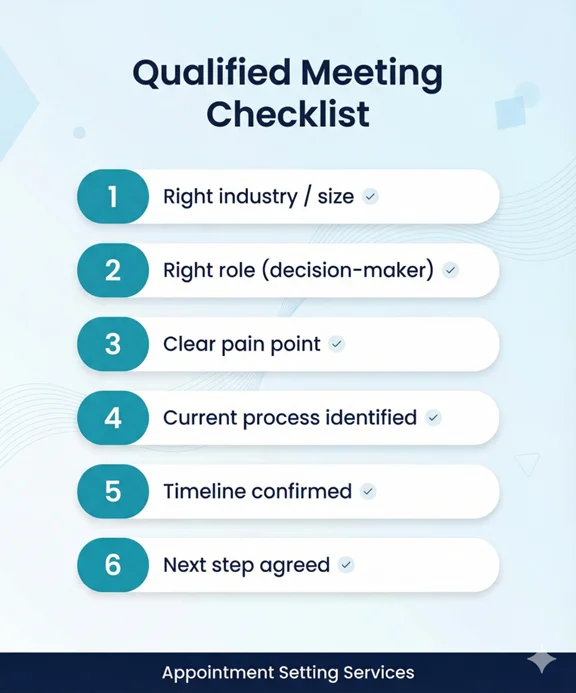
Pre-Visit Billing Support (Eligibility, Copays, Authorizations—When Applicable)
Appointment setting becomes a revenue tool when it triggers the right pre-visit billing checks. This reduces surprises at check-in and protects reimbursement.
Common pre-visit checks
- Eligibility verification (active coverage and plan benefits)
- Patient responsibility estimate (copay/deductible/out-of-pocket where available)
- Referral requirements (plan-dependent)
- Prior authorization triggers for specific services (payer-dependent)
- Visit limits (e.g., therapy, behavioral health, or plan-specific caps)
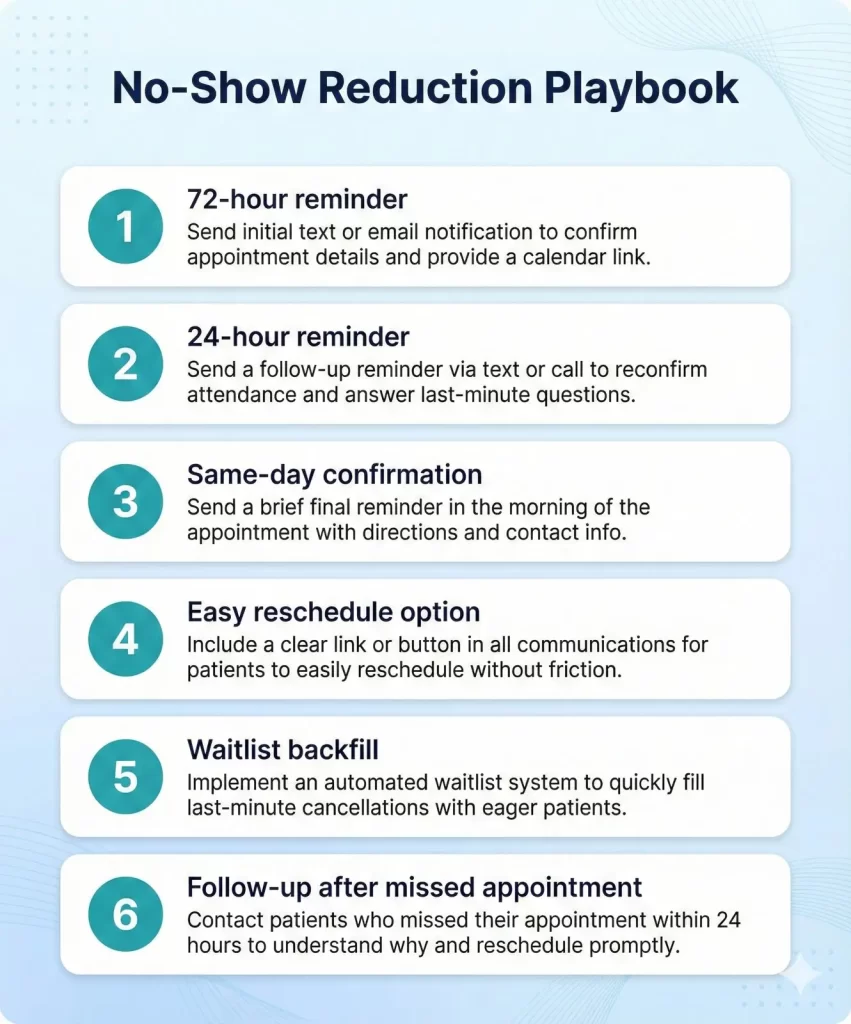
No-Show Reduction (Reminders, Confirmations, Waitlists)
No-shows don’t just hurt operations they reduce revenue and inflate A/R pressure. A disciplined appointment setting process reduces no-shows and fills gaps quickly.
High-impact tactics
- Multi-touch reminders (text/email + optional phone confirmation for high-risk appointments)
- Easy reschedule links or dedicated reschedule line
- Waitlist backfill workflow (same-day openings)
- Clear cancellation policy messaging (clinic-defined)
- Two-way texting for quick confirmations (when available)
Patient Experience Scripts (What We Say and What We Avoid)
What we say (examples)
- “I’ll confirm your insurance details so you’re set before your visit.”
- “If your plan requires an authorization for this service, we’ll flag it early so your appointment isn’t delayed.”
- “You may have a copay or deductible your clinic will confirm the exact amount at check-in.”
What we avoid
- Guaranteeing coverage (“This will definitely be covered.”)
- Quoting exact patient responsibility without the clinic’s approved process
- Discussing sensitive clinical details beyond what’s needed to schedule
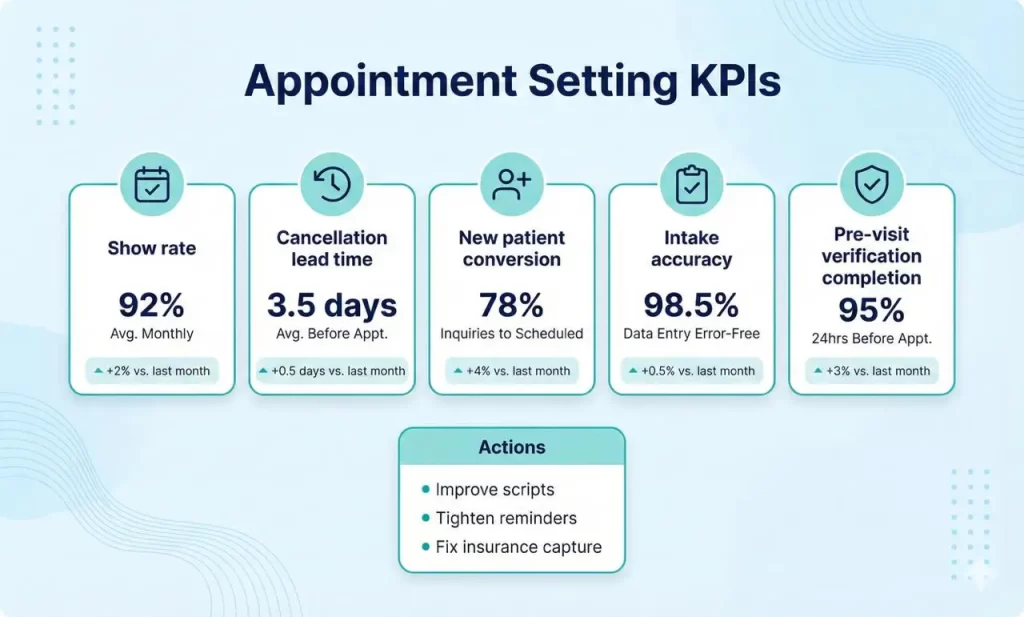
KPIs to Track (Weekly/Monthly)
| KPI | What it tells you | Common action |
|---|---|---|
| Show rate (kept appointments %) | No-show performance | Adjust reminder cadence and confirmation rules |
| Cancellation lead time | How early patients cancel | Strengthen policy messaging and backfill workflows |
| New patient conversion rate | How many inquiries become booked visits | Improve scripts and response speed |
| Insurance capture accuracy | How often intake data is correct | Add intake checklists and card-image collection |
| Pre-visit verification completion | Whether checks are done before the visit | Trigger rules and ownership clarity |
Security, Privacy, and Compliance Notes
Appointment setting may involve protected health information (PHI). Use secure systems, role-based access, least-privilege permissions, and audit trails. Only collect what’s necessary for scheduling and billing readiness, and avoid sharing patient information through insecure channels.
How Claim N Billing Handles Medical Appointment Setting
We handle appointment setting as part of the revenue cycle. Our process prioritizes clean intake, verification-ready insurance capture, consistent confirmations, and pre-visit billing triggers so appointments convert into clean claims and faster payments.
What you get
- Inbound appointment setting and patient intake support
- Verification-ready insurance capture and documentation requests (e.g., insurance card images)
- Confirmation and reminder cadence (clinic-defined)
- Reschedule, cancellation, and waitlist backfill workflows
- Pre-visit eligibility/PA triggers aligned with your billing workflow
- Monthly reporting on schedule health and intake quality
Frequently Asked Questions
Ready to Keep Your Medical Schedule Full and Organized?
Let’s walk through your current workflow and show you how we can support your practice.
Your billing should be as reliable as your care.